Rental Strategies For Discovery
How To Use PropLytics
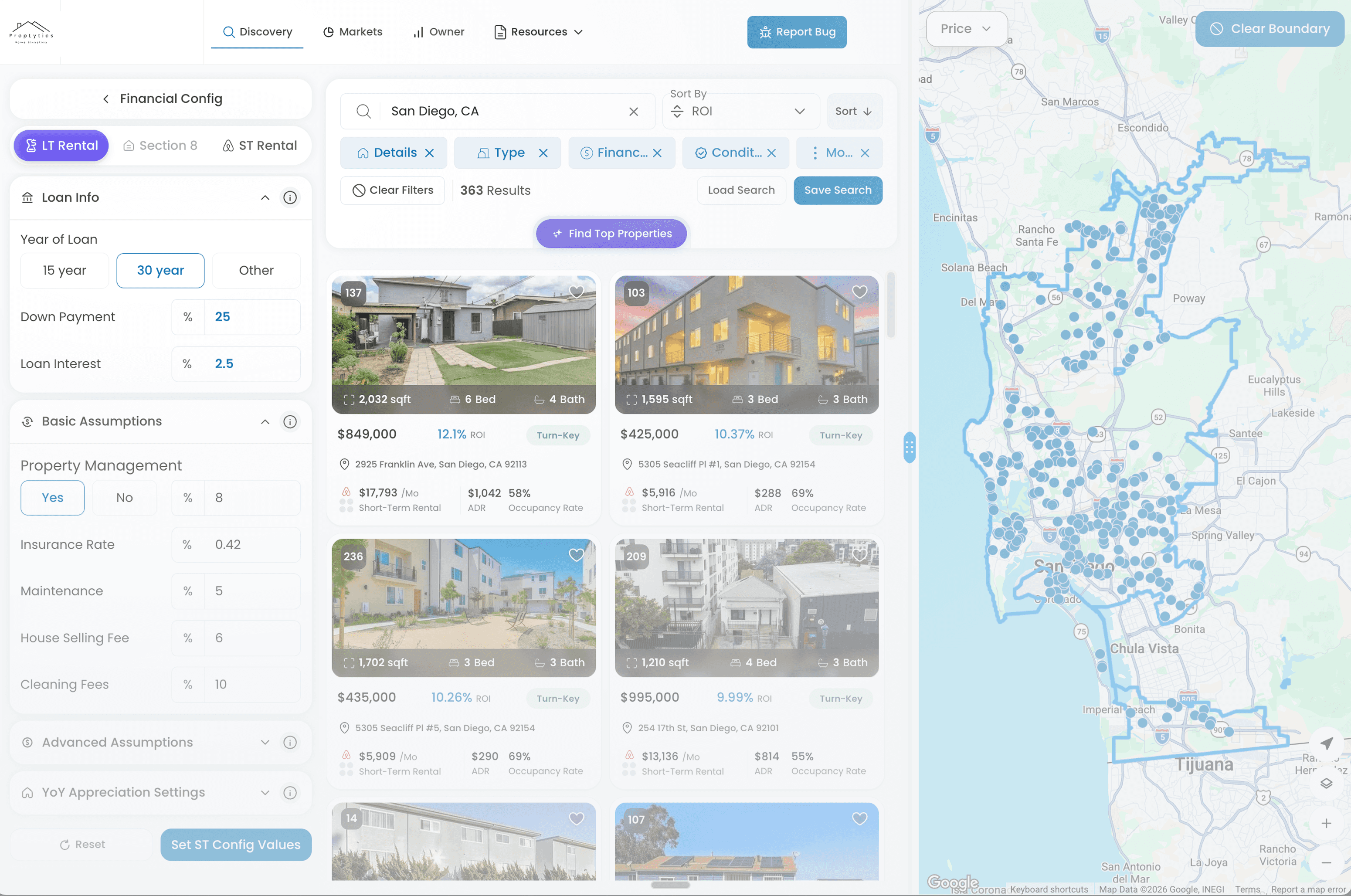
Rental Strategy Views let you switch between Long-Term (LT) and Short-Term (ST) assumptions to compare how properties perform under different strategies.
Overview
PropLytics supports multiple rental strategy views that determine how properties are evaluated and displayed. Switching between Long-Term and Short-Term rental views updates financial assumptions, available configuration inputs, and performance metrics across both Discovery and the map view.
You can adjust rental strategies before and after viewing a property, enabling comparison without changing context.
Overview
PropLytics supports multiple rental strategy views that determine how properties are evaluated and displayed. Switching between Long-Term and Short-Term rental views updates financial assumptions, available configuration inputs, and performance metrics across both Discovery and the map view.
You can adjust rental strategies before and after viewing a property, enabling comparison without changing context.
How To Use It
1. Toggle rental strategy
Use the toggle on the discovery page, and the individual property page, to switch between Long-Term and Short-Term rental strategies.
2. Strategy-specific assumptions
Each strategy applies its own assumptions (like expenses), based on the selected market; default values adjust automatically. For example, ADR is shown for Short-Term views but not Long-Term.
3. Compare stratagies
The selected rental strategy carries through from Discovery into the property view. You can change this within the property itself at the top left of the page.
4. Saved searches retain strategy
When you save a search, the active rental strategy is saved with it and restored when the search is reopened.
How To Use It
1. Toggle rental strategy
Use the toggle on the discovery page, and the individual property page, to switch between Long-Term and Short-Term rental strategies.
2. Strategy-specific assumptions
Each strategy applies its own assumptions (like expenses), based on the selected market; default values adjust automatically. For example, ADR is shown for Short-Term views but not Long-Term.
3. Compare stratagies
The selected rental strategy carries through from Discovery into the property view. You can change this within the property itself at the top left of the page.
4. Saved searches retain strategy
When you save a search, the active rental strategy is saved with it and restored when the search is reopened.
Use Cases
Compare LT vs ST performance quickly
Toggle strategies to see how ROI and cash flow differ for the same properties.
Evaluate strategy fit by market
Use market-specific assumptions to understand which rental strategy performs better in a given area.
Validate strategy at the property level
Review detailed financials under each strategy after opening a property.
Use Cases
Compare LT vs ST performance quickly
Toggle strategies to see how ROI and cash flow differ for the same properties.
Evaluate strategy fit by market
Use market-specific assumptions to understand which rental strategy performs better in a given area.
Validate strategy at the property level
Review detailed financials under each strategy after opening a property.
Good To Know
Short-Term data is in beta
Confidence values for Short-Term views will always display as None.
ROI breakdown changes by strategy
ROI components and calculations update based on the active rental strategy.
Multi-family properties are LT only
Short-Term rental views are not available for multi-family properties.
Section 8 is not yet active
Section 8 appears in the toggle but does not currently return data. Support will be added in a future release.
Good To Know
Short-Term data is in beta
Confidence values for Short-Term views will always display as None.
ROI breakdown changes by strategy
ROI components and calculations update based on the active rental strategy.
Multi-family properties are LT only
Short-Term rental views are not available for multi-family properties.
Section 8 is not yet active
Section 8 appears in the toggle but does not currently return data. Support will be added in a future release.